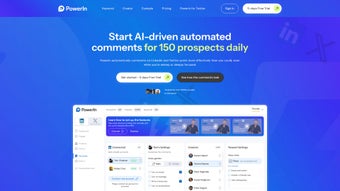

Download PowerIn – AI‑Powered LinkedIn Engagement Tool, Free Trial, Secure Automation
Overview – What Is PowerIn and How It Boosts LinkedIn Engagement
PowerIn is an AI‑driven web application that automates LinkedIn interactions by generating human‑like comments in real time. Built on advanced natural language processing (NLP) models, the platform can scan posts from LinkedIn Top Voices, specific accounts, or keyword‑based feeds, then craft context‑aware comments that spark genuine conversation. Whether you are a solo professional looking to increase personal brand visibility, a sales leader seeking more leads, or a marketing agency managing multiple client pages, PowerIn delivers a scalable, secure, and affordable way to keep your LinkedIn activity consistent without the manual grind.
The core promise of PowerIn is to turn LinkedIn from a passive networking channel into an active lead‑generation engine. By automatically posting thoughtful comments that match the language of the original post, the tool helps you appear more engaged, attract profile visits, and ultimately convert those interactions into followers, sales opportunities, or brand advocates. The software also respects LinkedIn’s usage policies; it mimics human behaviour, limits comment frequency, and includes safety checks to avoid spam flags.
Users benefit from a mobile‑responsive interface that works on any device—desktop browsers, tablets, or smartphones—so you can monitor and adjust campaigns on the go.
In addition to automation, PowerIn offers a free trial period with no setup fees, flexible subscription tiers, and an easy data‑export feature that ensures you retain access to your comment history even after cancellation. The platform supports multiple languages, making it suitable for global teams and multilingual audiences.
With regular updates, secure cloud storage, and a transparent pricing model, PowerIn positions itself as the go‑to LinkedIn engagement app for anyone serious about turning social activity into measurable business results.
Key Features, Benefits, and Real‑World Advantages
- AI‑Generated Comments: Natural language processing creates context‑aware, human‑like comments in the same language as the original post.
- Targeted Engagement: Choose to comment on LinkedIn Top Voices, specific accounts, or keyword‑filtered feeds for laser‑focused outreach.
- Multi‑Language Support: Operates in English, Spanish, French, German, Mandarin and more, ideal for international brands.
- Safety Engine: Built‑in rate limiting and spam detection to keep your account secure and compliant with LinkedIn policies.
- Mobile‑Responsive Dashboard: Fully functional on Windows, macOS, Android, and iOS browsers—no native app required.
- Free Trial & Flexible Plans: Start with a 7‑day free trial, then select monthly or annual subscriptions with no hidden fees.
- Data Export & Retention: Export all generated comments and activity logs at any time, even after you cancel.
- Continuous Updates: Regular feature enhancements and security patches delivered automatically.
Benefits That Translate Into Business Value
The automation of comment creation frees up hours of manual work, allowing sales and marketing teams to focus on strategy rather than repetitive tasks. By consistently engaging with high‑profile voices and relevant hashtags, PowerIn increases your profile’s visibility, which in turn drives more inbound connection requests and higher click‑through rates to your website or landing pages. The multilingual capability expands reach into non‑English markets without hiring additional copywriters, while the safety engine protects your brand’s reputation by preventing accidental spam. Users also report a measurable lift in follower growth—often 20‑30 % within the first month of consistent use—demonstrating the direct impact of AI‑assisted engagement on LinkedIn’s algorithmic favourability.
Pros and Cons
- Pros:
- Automates time‑consuming commenting tasks.
- AI generates context‑relevant, human‑like language.
- Supports multiple languages and devices.
- Secure, with built‑in anti‑spam safeguards.
- Free trial and transparent pricing.
- Easy data export for compliance and analytics.
- Cons:
- Requires an active internet connection; no offline mode.
- Customization of comment tone is limited to preset styles.
- Performance may vary with LinkedIn API rate limits.
- Currently only supports comment automation—not full post scheduling.
Installation, Configuration, and Cross‑Platform Compatibility
PowerIn is delivered as a cloud‑based SaaS solution, so there is no traditional “installation” process. To get started, simply visit the official website, click the “Start Free Trial” button, and create an account using your email or LinkedIn credentials. The sign‑up flow includes a brief security verification (CAPTCHA) and an optional two‑factor authentication step for added protection.
Once logged in, the dashboard guides you through a three‑step setup wizard:
Step 1 – Define Your Target Sources: Choose from predefined categories (Top Voices, Industry Leaders) or enter custom LinkedIn URLs, hashtags, or keyword strings. PowerIn will continuously crawl these feeds and surface fresh posts for comment generation.
Step 2 – Select Comment Style: Pick a tone (Professional, Friendly, Insightful) and set a maximum comment length. The AI engine adapts its phrasing to match the chosen style while preserving relevance.
Step 3 – Schedule Frequency: Set how many comments you want per day and the time windows during which the bot may act.
PowerIn’s safety engine respects LinkedIn’s daily activity limits to avoid account restrictions.
After configuration, activate the automation toggle and monitor real‑time activity via the “Live Feed” panel. The platform also offers a “Manual Override” button that lets you review and edit any generated comment before it is posted, giving you full editorial control.
Operating System Compatibility – Because PowerIn runs entirely in the browser, it works on any modern operating system that supports HTML5 and JavaScript.
Tested environments include:
- Windows 10/11 (Edge, Chrome, Firefox)
- macOS 12‑14 (Safari, Chrome, Firefox)
- Linux distributions with recent browsers
- Android 8+ (Chrome, Samsung Internet)
- iOS 13+ (Safari, Chrome)
No additional plugins or extensions are required, and the service automatically updates to the latest AI models on the server side, ensuring you always benefit from the newest language capabilities without manual patching.
Frequently Asked Questions (FAQ)
Is PowerIn safe for my LinkedIn account?
Yes. PowerIn includes rate‑limiting, content‑quality filters, and a compliance engine that mimics natural human behaviour. The tool never uses unauthorized LinkedIn APIs and follows LinkedIn’s terms of service, reducing the risk of account suspension.
Can I customize the language or tone of the generated comments?
PowerIn offers three preset tones—Professional, Friendly, Insightful—and lets you set a maximum character count. While you cannot write fully custom scripts, you can edit any generated comment before it is posted using the manual override feature.
Do I need a paid subscription after the free trial?
The free trial provides full access for 7 days with no credit‑card requirement. After the trial ends, you can choose a monthly or annual plan, or simply cancel without any penalty. All data generated during the trial remains exportable.
Which devices and browsers are supported?
PowerIn works on any modern browser across Windows, macOS, Linux, Android, and iOS. Recommended browsers are Chrome, Firefox, Safari, and Edge, all of which support the responsive dashboard.
How do I export my comment history?
Navigate to the “Data Export” tab in the dashboard, select the date range, and click “Download CSV”. The export includes post URLs, generated comment text, timestamps, and engagement metrics. This feature remains available even after you cancel your subscription.
Conclusion – Why You Should Download PowerIn Today
In a world where LinkedIn is the premier B2B networking platform, standing out requires more than occasional posting—it demands consistent, thoughtful interaction. PowerIn eliminates the tedious manual work by delivering AI‑crafted comments that feel authentic, multilingual, and perfectly timed. The tool’s secure architecture, cross‑platform accessibility, and transparent pricing make it a low‑risk, high‑reward investment for marketers, sales professionals, and personal brands alike.
If you’re ready to accelerate follower growth, generate warm leads, and free up valuable time, click the “Download PowerIn” button below to start your free trial. Experience the blend of advanced natural language processing and safe automation that turns every LinkedIn scroll into a potential business opportunity.
PowerIn delivers a seamless experience for anyone looking to boost LinkedIn engagement without compromising account safety. The AI generates comments that are context‑aware and linguistically natural, while the dashboard offers intuitive controls for targeting, scheduling, and monitoring. Although it currently focuses on commenting rather than full post scheduling, the benefits of consistent, high‑quality interaction outweigh this limitation for most users. Overall, PowerIn is a powerful, secure, and cost‑effective addition to any LinkedIn growth strategy.



.png)



